https://github.com/kubernetes/community/blob/master/sig-list.md
Showing posts with label k8s. Show all posts
Showing posts with label k8s. Show all posts
Nov 5, 2020


Dec 26, 2019
[hugepage][kernel][notes]
Reference:
k8s feature-gates:
https://kubernetes.io/docs/reference/command-line-tools-reference/feature-gates/
HugePages:
https://wiki.debian.org/Hugepages
Huge pages part 1, Introduction: https://lwn.net/Articles/374424/
Huge pages part 2, Interfaces: https://lwn.net/Articles/375096/
mmap: http://man7.org/linux/man-pages/man2/mmap.2.html
golang mmap: https://godoc.org/golang.org/x/exp/mmap
Use mmap With Care:
https://www.sublimetext.com/blog/articles/use-mmap-with-care
Nice write up, taking advantage of memory pages to load large files into memory with mmap(). Some gotcha to be aware of if files are located on network drive(e.g nfs).
k8s feature-gates:
https://kubernetes.io/docs/reference/command-line-tools-reference/feature-gates/
HugePages:
https://wiki.debian.org/Hugepages
Huge pages part 1, Introduction: https://lwn.net/Articles/374424/
Huge pages part 2, Interfaces: https://lwn.net/Articles/375096/
mmap: http://man7.org/linux/man-pages/man2/mmap.2.html
golang mmap: https://godoc.org/golang.org/x/exp/mmap
Use mmap With Care:
https://www.sublimetext.com/blog/articles/use-mmap-with-care
Nice write up, taking advantage of memory pages to load large files into memory with mmap(). Some gotcha to be aware of if files are located on network drive(e.g nfs).
Sep 28, 2019
[k8s][docker file] multiple stage build
Reference:
https://docs.docker.com/develop/develop-images/multistage-build/
Dockerfile:
Build command:
$ docker build -t alexellis2/href-counter:latest .
Name your build stages:
Dockerfile:
FROM golang:1.7.3 AS builder
WORKDIR /go/src/github.com/vsdmars/example/
RUN go get -d -v golang.org/x/net/html
COPY app.go .
RUN CGO_ENABLED=0 GOOS=linux go build -a -installsuffix cgo -o app .
FROM alpine:latest
RUN apk --no-cache add ca-certificates
WORKDIR /root/
WORKDIR /go/src/github.com/vsdmars/example/app .
CMD ["./app"]
Build specific stage:
$ docker build --target builder -t example:latest .
Use an external image as a "stage":
Use the COPY --from instruction to copy from a separate image,
either using the local image name, a tag available locally or on a Docker registry,
or a tag ID.
e.g
COPY --from=nginx:latest /etc/nginx/nginx.conf /nginx.conf
A few scenarios where this might be very powerful are:
- Debugging a specific build stage
- Using a debug stage with all debugging symbols or tools enabled, and a lean production stage
- Using a testing stage in which your app gets populated with test data, but building for production using a different stage which uses real data
https://docs.docker.com/develop/develop-images/multistage-build/
Dockerfile:
FROM golang:1.7.3
WORKDIR /go/src/github.com/vsdmars/example/
RUN go get -d -v golang.org/x/net/html
COPY app.go .
RUN CGO_ENABLED=0 GOOS=linux go build -a -installsuffix cgo -o app .
FROM alpine:latest
RUN apk --no-cache add ca-certificates
WORKDIR /root/
COPY --from=0 /go/src/github.com/vsdmars/example/app .
CMD ["./app"]
Build command:
$ docker build -t alexellis2/href-counter:latest .
Name your build stages:
Dockerfile:
FROM golang:1.7.3 AS builder
WORKDIR /go/src/github.com/vsdmars/example/
RUN go get -d -v golang.org/x/net/html
COPY app.go .
RUN CGO_ENABLED=0 GOOS=linux go build -a -installsuffix cgo -o app .
FROM alpine:latest
RUN apk --no-cache add ca-certificates
WORKDIR /root/
WORKDIR /go/src/github.com/vsdmars/example/app .
CMD ["./app"]
Build specific stage:
$ docker build --target builder -t example:latest .
Use an external image as a "stage":
Use the COPY --from instruction to copy from a separate image,
either using the local image name, a tag available locally or on a Docker registry,
or a tag ID.
e.g
COPY --from=nginx:latest /etc/nginx/nginx.conf /nginx.conf
A few scenarios where this might be very powerful are:
- Debugging a specific build stage
- Using a debug stage with all debugging symbols or tools enabled, and a lean production stage
- Using a testing stage in which your app gets populated with test data, but building for production using a different stage which uses real data
Jan 12, 2019
[k8s][patch] minikube start --vm-driver=none failed with latest docker runtime
With my SuSE having latest docker runtime installed(v18.09.0),
which, has not been verified by kubeadm (Major:"1", Minor:"13", GitVersion:"v1.13.2") yet,
causing minicube (v0.32.0) to fail passing the kubeadm step during install:
$ minikube start --vm-driver=none --kubernetes-version v1.13.2
If you are using minikube inside a VM, it would be fine,
but if you want to utilize minikube to install local kubernetes,
you need to patch minikube with this argument passing to kubeadm:
--ignore-preflight-errors=SystemVerification
Steps:
which, has not been verified by kubeadm (Major:"1", Minor:"13", GitVersion:"v1.13.2") yet,
causing minicube (v0.32.0) to fail passing the kubeadm step during install:
$ minikube start --vm-driver=none --kubernetes-version v1.13.2
If you are using minikube inside a VM, it would be fine,
but if you want to utilize minikube to install local kubernetes,
you need to patch minikube with this argument passing to kubeadm:
--ignore-preflight-errors=SystemVerification
Steps:
- Clone minikube source code to your local repository
$ git clone https://github.com/kubernetes/minikube.git $GOPATH/src/k8s.io/minikube - Patch pkg/minikube/constants/constants.go adding 'SystemVerification' to the Preflights slice data structure:
https://github.com/kubernetes/minikube/blob/master/pkg/minikube/constants/constants.go#L155
src:
var Preflights = []string{
// We use --ignore-preflight-errors=DirAvailable since we have our own custom addons
// that we also stick in /etc/kubernetes/manifests
"DirAvailable--etc-kubernetes-manifests",
"DirAvailable--data-minikube",
"Port-10250",
"FileAvailable--etc-kubernetes-manifests-kube-scheduler.yaml",
"FileAvailable--etc-kubernetes-manifests-kube-apiserver.yaml",
"FileAvailable--etc-kubernetes-manifests-kube-controller-manager.yaml",
"FileAvailable--etc-kubernetes-manifests-etcd.yaml",
// We use --ignore-preflight-errors=Swap since minikube.iso allocates a swap partition.
// (it should probably stop doing this, though...)
"Swap",
// We use --ignore-preflight-errors=CRI since /var/run/dockershim.sock is not present.
// (because we start kubelet with an invalid config)
"CRI",
"SystemVerification", // <- Patch here
} - build binary
$ make out/minikube-linux-amd64
[k8s] Secure setup
K8S Security
- Keep API Server secure from accessing by outsider
- Beware of runaway POD
- Helm tiller pod
- Validate Images (image scan, e.g coreos/clair)
For 1:
Most cloud provider's set up is fine.
For 2:
- Make sure running POD's service account has limited access to the cluster.
- Make sure with every k8s services, connect with authentication.
For 3:
- Beware the privilege granted to tiller POD. Once it's compromised, the cluster
is compromised. (Helm 3 will thus remove the use of tiller POD due to mainly the security issue)
Reference:
Creating a cluster network policy https://cloud.google.com/kubernetes-engine/docs/how-to/network-policy
Access control overview https://cloud.google.com/kubernetes-engine/docs/concepts/access-control
Using PodSecurityPolicies https://cloud.google.com/kubernetes-engine/docs/how-to/pod-security-policies
Jan 1, 2019
[k8s] Hard Multi-Tenancy in Kubernetes design ideas
Read and Resources:
https://blog.jessfraz.com/post/hard-multi-tenancy-in-kubernetes/
https://groups.google.com/forum/#!forum/kubernetes-wg-multitenancy
https://tech.paulcz.net/blog/future-of-kubernetes-is-virtual-machines/
And actually VMWare has PhotonOS years ago (i worked on projects based on it in VMW)
Projects:
virtual-kubelet https://github.com/virtual-kubelet/virtual-kubelet
gVisor (a layer of abstraction on top of the linux kernel) https://github.com/google/gvisor
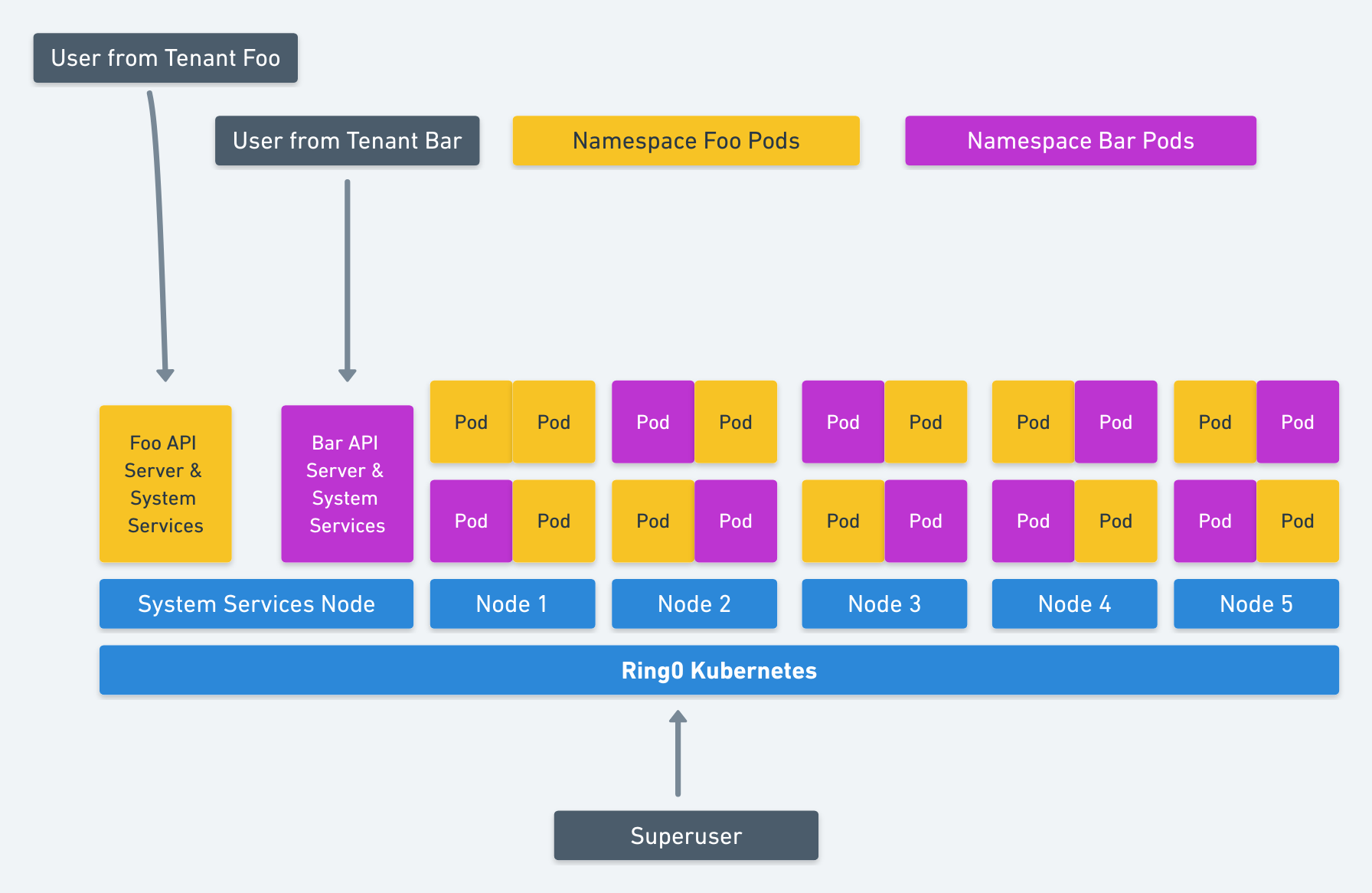
( figure from: https://blog.jessfraz.com/post/hard-multi-tenancy-in-kubernetes/ )
https://blog.jessfraz.com/post/hard-multi-tenancy-in-kubernetes/
https://groups.google.com/forum/#!forum/kubernetes-wg-multitenancy
https://tech.paulcz.net/blog/future-of-kubernetes-is-virtual-machines/
And actually VMWare has PhotonOS years ago (i worked on projects based on it in VMW)
Projects:
virtual-kubelet https://github.com/virtual-kubelet/virtual-kubelet
gVisor (a layer of abstraction on top of the linux kernel) https://github.com/google/gvisor
( figure from: https://blog.jessfraz.com/post/hard-multi-tenancy-in-kubernetes/ )
Sep 30, 2018
[k8s][admin] openSuSE setup at ease [k8s v1.16]
Creates dummy network link for k8s through systemd:
Reference:
Systemd notes: http://vsdmars.blogspot.com/2018/09/systemdadmin-verbatim-write-up-from.html
systemd.netdev — Virtual Network Device configuration
systemd.network — Network configuration
1. Under /etc/systemd/network creates
.netdev
.network
2.
10-eth42.netdev:
3.
20-eth42.network:
4. Use $ networkctl to show network device information.
For every systemd config, place under:
$ /etc/systemd
DO NOT TOUCH
/usr/lib/systemd
Copy Backup systemd files to /etc/systemd:
Be sure SWAP is turned off:
Reference:
https://wiki.archlinux.org/index.php/Swap#Disabling_swap
https://fedoramagazine.org/systemd-masking-units/
1. edit /etc/fstab make sure swap is commented.
2. if using systemd, first make sure which .swap type is responsible:
$ systemctl --type swap
3. Mask it:
$ systemctl mask dev-nvme0n1p3.swap
Document reference:
https://kubernetes.io/docs/setup/production-environment/tools/kubeadm/install-kubeadm/
Download latest binary:
https://github.com/kubernetes/kubernetes/releases
Reference:
https://kubernetes.io/docs/setup/independent/create-cluster-kubeadm/
1.
Be sure kubelet is installed with systemd, which will be triggered to run with kubeadm.
(Reference:
https://kubernetes.io/docs/reference/command-line-tools-reference/kubelet/
Dynamic-kubelet-configuration:
https://kubernetes.io/blog/2018/07/11/dynamic-kubelet-configuration/ )
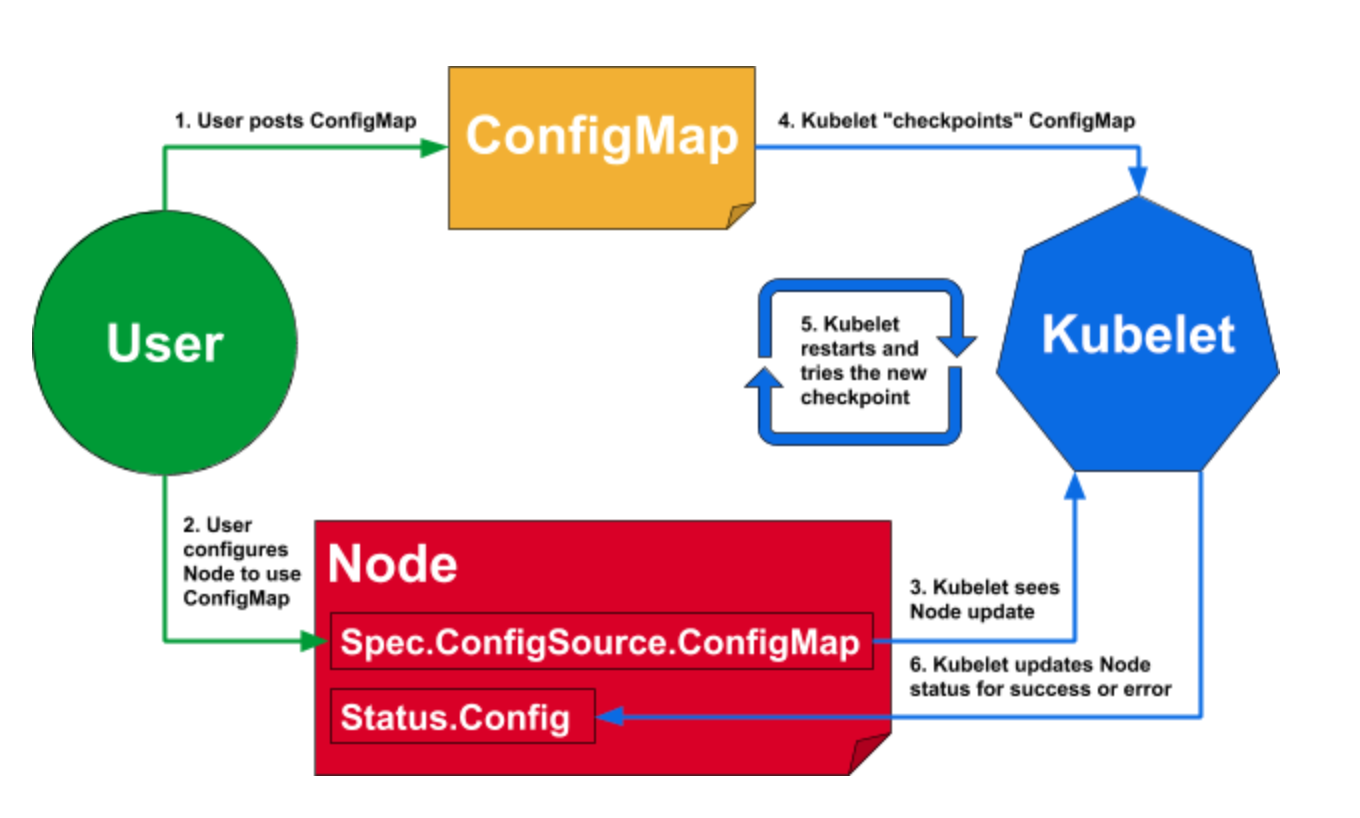
Enable kubelet systemd service before calling kubeadm
$ systemctl enable kubelet.service
2.
Be sure to tear down previous k8s if there's one.
(Reference:
https://kubernetes.io/docs/setup/independent/create-cluster-kubeadm/#tear-down)
Use kubeadm to generate config/manifest files.
(Reference:
https://kubernetes.io/docs/setup/production-environment/tools/kubeadm/install-kubeadm/
https://kubernetes.io/docs/concepts/overview/components/#master-components
https://kubernetes.io/docs/setup/independent/create-cluster-kubeadm/ )
kubeadm generates /var/lib/kubelet/config.yaml for kubelet to create
containers for k8s master services.
-- Using docker for dev environment --
Reference:
https://kubernetes.io/docs/setup/cri/
On my openSuSE enviroment, CRI-O is the default container runtime.
kubeadm uses CRI-O's 'conmon' to create containers.
(CRI-O reference:
https://medium.com/cri-o/cri-o-198c84185c94 )
For showing current CRI-O's cgroups driver:
(Reference: https://github.com/cri-o/cri-o/issues/2414)
Under /etc/crio/crio.conf grep for cgroup_manager
This information is needed by control plane kubelet's setting( /etc/sysconfig/kubelet ):
--cgroup-driver=systemd
Note: Since --cgroup-driver flag has been deprecated by kubelet, if you have that in /var/lib/kubelet/kubeadm-flags.env or /etc/default/kubelet(/etc/sysconfig/kubelet for RPMs), please remove it and use the KubeletConfiguration instead (stored in /var/lib/kubelet/config.yaml by default).
CMD for CRI-O:
Allow non-root user uses crictl:
$ chmod 0775 /var/run/crio/crio.sock && chgrp docker /var/run/crio/crio.sock
$ crictl pods
Make sure has correct variables
$ cat /etc/sysconfig/kubelet
Or can copy from /usr/share/fillup-templates/sysconfig.kubelet to /etc/sysconfig/kubelet
Letting iptables see bridged traffic:
--
cat <<EOF | sudo tee /etc/sysctl.d/k8s.conf
net.bridge.bridge-nf-call-ip6tables = 1
net.bridge.bridge-nf-call-iptables = 1
EOF
sudo sysctl --system
--
Before trigger kubeadm init, run
$ kubeadm config images pull --cri-socket /var/run/crio/crio.sock
Ignore preflight error reported from SystemVerification due to I'm using btrfs.
(reference:
https://marc.xn--wckerlin-0za.ch/computer/kubernetes-on-ubuntu-16-04 )
$ kubeadm init --pod-network-cidr=10.244.0.0/16 --apiserver-advertise-address=172.30.0.1 --cri-socket=/var/run/crio/crio.sock
CMD for Listing token:
(reference:
https://kubernetes.io/docs/reference/setup-tools/kubeadm/kubeadm-token/ )
$ kubeadm token
4.
Install k8s cluster network CNI plugin:
I choose to use Calico as k8s network proxy,
(reference:
https://kubernetes.io/docs/setup/independent/create-cluster-kubeadm/#pod-network
Do not use flannel as CNI:
https://github.com/kubernetes/website/commit/f73647531dcdade2327412253a5f839781d57897/
)
Not needed if sysctl is set above:
$ sysctl net.bridge.bridge-nf-call-iptables=1
Run as NON-ROOT
$ kubectl apply -f https://docs.projectcalico.org/v3.11/manifests/calico.yaml
Remember to turn off firewall if can not connect to local pod.
$ systemctl stop firewalld
5.
Using control plane node as single node k8s which allows it to be
scheduled for pod creating.
(reference:
https://kubernetes.io/docs/setup/independent/create-cluster-kubeadm/ )
$ kubectl taint nodes --all node-role.kubernetes.io/master-
https://kubernetes.io/docs/setup/independent/create-cluster-kubeadm/
https://kubernetes.io/docs/setup/independent/high-availability/
Kubernetes uses


$ k get clusterrolebindings
$ k get clusterroles
Most important roles:
Rolebinding service account to cluster-admin cluster role gives you EVERYTHING.

$ k get clusterroles cluster-admin -o yaml
----
apiVersion: rbac.authorization.k8s.io/v1beta1
kind: ClusterRole
metadata:
annotations:
rbac.authorization.kubernetes.io/autoupdate: "true"
labels:
kubernetes.io/bootstrapping: rbac-defaults
name: cluster-admin
rules:
- apiGroups:
- '*'
resources:
- '*'
verbs:
- '*'
- nonResourceURLs:
- '*'
verbs:
- '*'
$ k get clusterroles admin -o yaml
----
apiVersion: rbac.authorization.k8s.io/v1beta1
kind: ClusterRole
metadata:
annotations:
rbac.authorization.kubernetes.io/autoupdate: "true"
creationTimestamp: 2018-11-20T21:04:20Z
labels:
kubernetes.io/bootstrapping: rbac-defaults
name: admin
resourceVersion: "19"
selfLink: /apis/rbac.authorization.k8s.io/v1beta1/clusterroles/admin
uid: d95beeca-ed07-11e8-bd26-005056b92976
rules:
- apiGroups:
- ""
resources:
- pods
- pods/attach
- pods/exec
- pods/portforward
- pods/proxy
verbs:
- create
- delete
- deletecollection
- get
- list
- patch
- update
- watch
- apiGroups:
- ""
resources:
- configmaps
- endpoints
- persistentvolumeclaims
- replicationcontrollers
- replicationcontrollers/scale
----

Be aware that if the pod template in the Deployment references a ConfigMap (or a Secret), modifying the ConfigMap will not trigger an update.


Reference:
Systemd notes: http://vsdmars.blogspot.com/2018/09/systemdadmin-verbatim-write-up-from.html
systemd.netdev — Virtual Network Device configuration
systemd.network — Network configuration
1. Under /etc/systemd/network creates
.netdev
.network
2.
10-eth42.netdev:
[NetDev]
Name=eth42
Kind=dummy
3.
20-eth42.network:
[Match]
Name=eth42

[Network]
Address=172.30.0.1/16
DNS=8.8.8.8
4. Use $ networkctl to show network device information.
For every systemd config, place under:
$ /etc/systemd
DO NOT TOUCH
/usr/lib/systemd
Copy Backup systemd files to /etc/systemd:
- system/kubelet.service
- system/crio.service.d/10-crio.conf
- network/10-eth42.netdev
- network/20-eth42.network
Be sure SWAP is turned off:
Reference:
https://wiki.archlinux.org/index.php/Swap#Disabling_swap
https://fedoramagazine.org/systemd-masking-units/
1. edit /etc/fstab make sure swap is commented.
2. if using systemd, first make sure which .swap type is responsible:
$ systemctl --type swap
3. Mask it:
$ systemctl mask dev-nvme0n1p3.swap
Document reference:
https://kubernetes.io/docs/setup/production-environment/tools/kubeadm/install-kubeadm/
Download latest binary:
https://github.com/kubernetes/kubernetes/releases
Reference:
https://kubernetes.io/docs/setup/independent/create-cluster-kubeadm/
1.
Be sure kubelet is installed with systemd, which will be triggered to run with kubeadm.
(Reference:
https://kubernetes.io/docs/reference/command-line-tools-reference/kubelet/
Dynamic-kubelet-configuration:
https://kubernetes.io/blog/2018/07/11/dynamic-kubelet-configuration/ )
Enable kubelet systemd service before calling kubeadm
$ systemctl enable kubelet.service
2.
Be sure to tear down previous k8s if there's one.
(Reference:
https://kubernetes.io/docs/setup/independent/create-cluster-kubeadm/#tear-down)
- Drain the node if it has pod's running on it
$ kubectl drain <node name> --delete-local-data --force --ignore-daemonsets
$ kubectl delete node <node name> - $ kubeadm reset
- $ iptables -F && iptables -t nat -F && iptables -t mangle -F && iptables -X
- Reset IPVS if necessary
$ ipvsadm -C
Use kubeadm to generate config/manifest files.
(Reference:
https://kubernetes.io/docs/setup/production-environment/tools/kubeadm/install-kubeadm/
https://kubernetes.io/docs/concepts/overview/components/#master-components
https://kubernetes.io/docs/setup/independent/create-cluster-kubeadm/ )
kubeadm generates /var/lib/kubelet/config.yaml for kubelet to create
containers for k8s master services.
-- Using docker for dev environment --
Reference:
https://kubernetes.io/docs/setup/cri/
On my openSuSE enviroment, CRI-O is the default container runtime.
kubeadm uses CRI-O's 'conmon' to create containers.
(CRI-O reference:
https://medium.com/cri-o/cri-o-198c84185c94 )
For showing current CRI-O's cgroups driver:
(Reference: https://github.com/cri-o/cri-o/issues/2414)
Under /etc/crio/crio.conf grep for cgroup_manager
This information is needed by control plane kubelet's setting( /etc/sysconfig/kubelet ):
--cgroup-driver=systemd
Note: Since --cgroup-driver flag has been deprecated by kubelet, if you have that in /var/lib/kubelet/kubeadm-flags.env or /etc/default/kubelet(/etc/sysconfig/kubelet for RPMs), please remove it and use the KubeletConfiguration instead (stored in /var/lib/kubelet/config.yaml by default).
CMD for CRI-O:
Allow non-root user uses crictl:
$ chmod 0775 /var/run/crio/crio.sock && chgrp docker /var/run/crio/crio.sock
$ crictl pods
Make sure has correct variables
$ cat /etc/sysconfig/kubelet
Or can copy from /usr/share/fillup-templates/sysconfig.kubelet to /etc/sysconfig/kubelet
Letting iptables see bridged traffic:
--
cat <<EOF | sudo tee /etc/sysctl.d/k8s.conf
net.bridge.bridge-nf-call-ip6tables = 1
net.bridge.bridge-nf-call-iptables = 1
EOF
sudo sysctl --system
--
Before trigger kubeadm init, run
$ kubeadm config images pull --cri-socket /var/run/crio/crio.sock
Ignore preflight error reported from SystemVerification due to I'm using btrfs.
(reference:
https://marc.xn--wckerlin-0za.ch/computer/kubernetes-on-ubuntu-16-04 )
$ kubeadm init --pod-network-cidr=10.244.0.0/16 --apiserver-advertise-address=172.30.0.1 --cri-socket=/var/run/crio/crio.sock
CMD for Listing token:
(reference:
https://kubernetes.io/docs/reference/setup-tools/kubeadm/kubeadm-token/ )
$ kubeadm token
4.
Install k8s cluster network CNI plugin:
I choose to use Calico as k8s network proxy,
(reference:
https://kubernetes.io/docs/setup/independent/create-cluster-kubeadm/#pod-network
Do not use flannel as CNI:
https://github.com/kubernetes/website/commit/f73647531dcdade2327412253a5f839781d57897/
)
Not needed if sysctl is set above:
$ sysctl net.bridge.bridge-nf-call-iptables=1
Run as NON-ROOT
$ kubectl apply -f https://docs.projectcalico.org/v3.11/manifests/calico.yaml
Remember to turn off firewall if can not connect to local pod.
$ systemctl stop firewalld
5.
Using control plane node as single node k8s which allows it to be
scheduled for pod creating.
(reference:
https://kubernetes.io/docs/setup/independent/create-cluster-kubeadm/ )
$ kubectl taint nodes --all node-role.kubernetes.io/master-
Service Account
Service Account usernames format:
- system:serviceaccount:<namespace>:<service account name>
kubeadm
https://kubernetes.io/docs/reference/setup-tools/kubeadm/kubeadm/https://kubernetes.io/docs/setup/independent/create-cluster-kubeadm/
https://kubernetes.io/docs/setup/independent/high-availability/
Authentication
https://kubernetes.io/docs/reference/access-authn-authz/authentication/
https://kubernetes.io/docs/tasks/access-application-cluster/configure-access-multiple-clusters/
https://kubernetes.io/docs/reference/access-authn-authz/rbac/
https://github.com/kubernetes/website/issues/3820
https://kubernetes.io/docs/tasks/access-application-cluster/configure-access-multiple-clusters/
https://kubernetes.io/docs/reference/access-authn-authz/rbac/
https://github.com/kubernetes/website/issues/3820
- system:unauthenticated group is used for requests where none of the authentication plugins could authenticate the client.
- system:authenticated group is automatically assigned to a user who was authenticated successfully.
- system:serviceaccounts group encompasses all ServiceAccounts in the system.
- system:serviceaccounts:<namespace> includes all ServiceAccounts in a specific namespace.
Kubernetes uses
- client certificates,
- bearer tokens,
- an authenticating proxy,
- or HTTP basic auth
As HTTP requests are made to the API server, plugins attempt to associate the following attributes with the request:
- Username: a string which identifies the end user. Common values might be kube-admin or jane@example.com.
- UID: a string which identifies the end user and attempts to be more consistent and unique than username.
- Groups: a set of strings which associate users with a set of commonly grouped users.
- Extra fields: a map of strings to list of strings which holds additional information authorizers may find useful.
Authorization


$ k get clusterrolebindings
$ k get clusterroles
Most important roles:
- admin
- cluster-admin
- edit
- view
Rolebinding service account to cluster-admin cluster role gives you EVERYTHING.

$ k get clusterroles cluster-admin -o yaml
----
apiVersion: rbac.authorization.k8s.io/v1beta1
kind: ClusterRole
metadata:
annotations:
rbac.authorization.kubernetes.io/autoupdate: "true"
labels:
kubernetes.io/bootstrapping: rbac-defaults
name: cluster-admin
rules:
- apiGroups:
- '*'
resources:
- '*'
verbs:
- '*'
- nonResourceURLs:
- '*'
verbs:
- '*'
----
$ k get clusterroles admin -o yaml
----
apiVersion: rbac.authorization.k8s.io/v1beta1
kind: ClusterRole
metadata:
annotations:
rbac.authorization.kubernetes.io/autoupdate: "true"
creationTimestamp: 2018-11-20T21:04:20Z
labels:
kubernetes.io/bootstrapping: rbac-defaults
name: admin
resourceVersion: "19"
selfLink: /apis/rbac.authorization.k8s.io/v1beta1/clusterroles/admin
uid: d95beeca-ed07-11e8-bd26-005056b92976
rules:
- apiGroups:
- ""
resources:
- pods
- pods/attach
- pods/exec
- pods/portforward
- pods/proxy
verbs:
- create
- delete
- deletecollection
- get
- list
- patch
- update
- watch
- apiGroups:
- ""
resources:
- configmaps
- endpoints
- persistentvolumeclaims
- replicationcontrollers
- replicationcontrollers/scale
- secrets
- serviceaccounts
- services
- services/proxy
verbs:
- create
- delete
- deletecollection
- get
- list
- patch
- update
- watch
- apiGroups:
- ""
resources:
- bindings
- events
- limitranges
- namespaces/status
- pods/log
- pods/status
- replicationcontrollers/status
- resourcequotas
- resourcequotas/status
verbs:
- get
- list
- watch
- apiGroups:
- ""
resources:
- namespaces
verbs:
- get
- list
- watch
...
K8S Deployment

Be aware that if the pod template in the Deployment references a ConfigMap (or a Secret), modifying the ConfigMap will not trigger an update.
One way to trigger an update when you need to modify an app’s config is to create a new ConfigMap and modify the pod template so it references the new ConfigMap.
During the rolling upgrade, the old replicset will not be deteled due to useful for rolling back.
--
spec:
During the rolling upgrade, the old replicset will not be deteled due to useful for rolling back.
--
spec:
strategy:
rollingUpdate:
rollingUpdate:
maxSurge: 1
maxUnavailable: 0
type: RollingUpdate
type: RollingUpdate
--


K8S DNS Types
- Service
XXX.{namespace}.svc.cluster.local - Pod
XXX.{namespace}.pod.cluster.local
Cheatsheet
https://kubernetes.io/docs/reference/kubectl/cheatsheet/API Reference
https://kubernetes.io/docs/reference/generated/kubernetes-api/v1.13/CRI Runtime
CRI-O
Sep 28, 2018
[k8s][admin] k8s skaffold
skaffold is an automation tool for deploying bits to k8s in a pipeline fashion.
Act as watchman for k8s deployment by monitoring the changes of files depicted
inside the Dockerfile's "COPY/ADD" commands. (skaffold does honor .dockerignore [file format])
Once the files stats' last time modification changed, skaffold will kick off image build(docker build) and deploy the built images to k8s.
(either through kubectl / helm / kustomize)
The tool is relatively new and not well documented, here's the example I created for future reference. (Some hidden yaml key/value features can only be seen through the source code :-D )
It supports bazel build as well, will add example for that later(WIP).
It supports kaniko build which could build Dockerfile without docker daemon(With gVisor).
https://github.com/buddhavs/k8s_skaffold_example
Reference:
official skaffold.yaml annotation
Update:
Turns out a better document for skaffold is here (for devs :-D ):
https://skaffold.dev/
Act as watchman for k8s deployment by monitoring the changes of files depicted
inside the Dockerfile's "COPY/ADD" commands. (skaffold does honor .dockerignore [file format])
Once the files stats' last time modification changed, skaffold will kick off image build(docker build) and deploy the built images to k8s.
(either through kubectl / helm / kustomize)
The tool is relatively new and not well documented, here's the example I created for future reference. (Some hidden yaml key/value features can only be seen through the source code :-D )
It supports bazel build as well, will add example for that later(WIP).
It supports kaniko build which could build Dockerfile without docker daemon(With gVisor).
https://github.com/buddhavs/k8s_skaffold_example
Reference:
official skaffold.yaml annotation
Update:
Turns out a better document for skaffold is here (for devs :-D ):
https://skaffold.dev/
Subscribe to:
Posts (Atom)