Showing posts with label k8s_admin. Show all posts

Dec 26, 2019

[hugepage][kernel][notes]

Reference:
k8s feature-gates:
https://kubernetes.io/docs/reference/command-line-tools-reference/feature-gates/

HugePages:
https://wiki.debian.org/Hugepages

Huge pages part 1, Introduction: https://lwn.net/Articles/374424/
Huge pages part 2, Interfaces: https://lwn.net/Articles/375096/

mmap: http://man7.org/linux/man-pages/man2/mmap.2.html

golang mmap: https://godoc.org/golang.org/x/exp/mmap

Use mmap With Care:
https://www.sublimetext.com/blog/articles/use-mmap-with-care
Nice write up, taking advantage of memory pages to load large files into memory with mmap(). Some gotcha to be aware of if files are located on network drive(e.g nfs).


Jan 12, 2019

[k8s][patch] minikube start --vm-driver=none failed with latest docker runtime

With my SuSE having latest docker runtime installed(v18.09.0),
which, has not been verified by kubeadm (Major:"1", Minor:"13", GitVersion:"v1.13.2") yet,
causing minicube (v0.32.0) to fail passing the kubeadm step during install:

$ minikube start --vm-driver=none --kubernetes-version v1.13.2


If you are using minikube inside a VM, it would be fine,
but if you want to utilize minikube to install local kubernetes,
you need to patch minikube with this argument passing to kubeadm:

--ignore-preflight-errors=SystemVerification


Steps:
  1. Clone minikube source code to your local repository
    $ git clone https://github.com/kubernetes/minikube.git $GOPATH/src/k8s.io/minikube
  2. Patch pkg/minikube/constants/constants.go adding 'SystemVerification' to the Preflights slice data structure:
    https://github.com/kubernetes/minikube/blob/master/pkg/minikube/constants/constants.go#L155
    src:
    var Preflights = []string{
    // We use --ignore-preflight-errors=DirAvailable since we have our own custom addons
    // that we also stick in /etc/kubernetes/manifests
     "DirAvailable--etc-kubernetes-manifests",
      "DirAvailable--data-minikube",
      "Port-10250",
      "FileAvailable--etc-kubernetes-manifests-kube-scheduler.yaml",
      "FileAvailable--etc-kubernetes-manifests-kube-apiserver.yaml",
      "FileAvailable--etc-kubernetes-manifests-kube-controller-manager.yaml",
      "FileAvailable--etc-kubernetes-manifests-etcd.yaml",
      // We use --ignore-preflight-errors=Swap since minikube.iso allocates a swap partition.
      // (it should probably stop doing this, though...)
      "Swap",
      // We use --ignore-preflight-errors=CRI since /var/run/dockershim.sock is not present.
      // (because we start kubelet with an invalid config)
      "CRI",
      "SystemVerification",   // <- Patch here
    }
  3. build binary
    $ make out/minikube-linux-amd64  
Enjoy.

[k8s] Secure setup

K8S Security

  1. Keep API Server secure from accessing by outsider
  2. Beware of runaway POD
  3. Helm tiller pod
  4. Validate Images (image scan, e.g coreos/clair)


For 1:
Most cloud provider's set up is fine.


For 2:
  1. Make sure running POD's service account has limited access to the cluster.
  2. Make sure with every k8s services, connect with authentication.

For 3:
  1. Beware the privilege granted to tiller POD. Once it's compromised, the cluster
    is compromised. (Helm 3 will thus remove the use of tiller POD due to mainly the security issue)

Reference:
Creating a cluster network policy https://cloud.google.com/kubernetes-engine/docs/how-to/network-policy
Access control overview https://cloud.google.com/kubernetes-engine/docs/concepts/access-control
Using PodSecurityPolicies https://cloud.google.com/kubernetes-engine/docs/how-to/pod-security-policies

Dec 24, 2018

[linux][namespace] Mount (mnt)

Mount namespaces and shared subtrees
Reference: 
https://lwn.net/Articles/689856/
https://www.kernel.org/doc/Documentation/filesystems/sharedsubtree.txt
https://www.kernel.org/doc/html/v5.0/
http://man7.org/linux/man-pages/man7/mount_namespaces.7.html

  • Each mount namespace has its own list of mount points.
    When the system is first booted, there is a single mount namespace,
    the so-called "initial namespace".
  • New mount namespaces are created by using the CLONE_NEWNS flag
    with either the clone() system call (to create a new child process in the new namespace)
    or the unshare() system call (to move the caller into the new namespace).
  • When a new mount namespace is created, it receives a copy of the mount point list replicated from the namespace of the caller of clone() or unshare().
  • Changes to the mount point list are (by default) visible only to processes in the mount namespace where the process resides;
    the changes are not visible in other mount namespaces.


Shared subtrees:
We do not want to re-mount a DVD-ROM in every mount space.
Each mount point is marked with a "propagation type",
which determines whether mount points created and removed
under this mount point are propagated to other mount points.

4 shared types:
  • MS_SHARED
    Make this mount point shared.
    Mount and unmount events immediately under this mount point will propagate to the other mount points that are members of this mount's peer group. Propagation here means that the same mount or unmount will automatically occur under all of the other mount points in the peer group.
    Conversely, mount and unmount events that take place under peer mount points will propagate to this mount point.
  • MS_PRIVATE
    Make this mount point private.
    Mount and unmount events do not propagate into or out of this mount point.
  • MS_SLAVE
    If this is a shared mount point that is a member of a peer group that contains other members, convert it to a slave mount.
    If this is a shared mount point that is a member of a peer group that contains no other members, convert it to a private mount. 
    Otherwise, the propagation type of the mount point is left unchanged.
    When a mount point is a slave, mount and unmount events propagate into this mount point from the (master) shared peer group of which it was formerly a member.
    Mount and unmount events under this mount point do not propagate to any peer.
    A mount point can be the slave of another peer group while at the same time sharing mount and unmount events with a peer group of which it is a member.
  • MS_UNBINDABLE
    Make this mount unbindable.
    This is like a private mount, and in addition this mount can't be bind mounted.  When a recursive bind mount (mount() with the MS_BIND and MS_REC flags) is performed on a directory subtree, any unbindable mounts within the subtree are automatically pruned (i.e., not replicated) when replicating that subtree to produce the target subtree.


Peer groups:
A peer group is a set of mount points that propagate mount and unmount events to one another.


Examining propagation types and peer groups via
/proc/PID/mountinfo:
The /proc/PID/mountinfo file (documented in the proc(5) manual page) displays a range of information about the mount points for the mount namespace in which the process PID resides. All processes that reside in the same mount namespace will see the same view in this file.


List current process's mount information:
$ cat /proc/self/mountinfo | sed 's/ - .*//'

[linux][namespace] wrap-up

Linux Namespace is relatively new idea in the linux space which is the
fundamental of containers as well as Kubernetes.

Those design/api were not mentioned in the TLPI book, which becomes more essential nowadays due to the rise of distributed computing(sever-less, lambda, whatever fancy words you name it~)

This page is used as index page for further linux namespace ideas/design/programming.
Currently my coding language are C++(modern)/Golang/Python.


Traditional process resource limit:

http://man7.org/linux/man-pages/man1/prlimit.1.html
$ prlimit --nofile=256 --nproc=512 --locks=32 /bin/bash


ps shows PPID/SID:
$ ps -efj


Linux namespace directories for debugging:
/proc/*/ns/*
/proc/*/task/*/ns/*
/proc/self/ns  # caller's namespace information
/proc/sys/kernel/ns_last_pid # the last PID that was allocated in this PID namespace.
/run/netns/netns-name  # created network namespace
/run/netns/default  # default network namespace
/sys/fs/cgroup # cgroup information

Namespace is differentiated by ID(integer)


List all namespace ID with in all processes:
$ readlink /proc/*/task/*/ns/* | sort -u


List all namespace under root PID 1 namespace:
This can be used to find the default linux namespaces
$ readlink /proc/1/task/*/ns/* | sort -u


Use bind mount to persist a linux namespace:
Reference:
https://unix.stackexchange.com/a/198591

$ mount --bind /proc/pid/ns/type /anywhere/you/want
Thus later on you could use nsenter(1)/unshare(1)(2)/setns(2) to
enter that namespace.


Linux PID namespace has some extended behaviors which should be noticed:
  • A process's namespace is settled when it's created. Period.
    It CANNOT be changed even with 'setns'.
    'setns' will only associated the child created by the caller PID with the new
    namespace but not the caller itself.
    (Since Linux 4.12, that new PID namespace is shown via the
    /proc/[pid]/ns/pid_for_children file.)
    Once the caller PID calls 'setns', all it's children will be put into the new PID namespace.
    The children's call to 'getppid(2)' will return 0 since they
    CANNOT observe the PID outside it's own PID namespace.
    Beware, processes may not enter any ancestor namespaces (parent, grandparent, etc.).
    Changing PID namespaces is a one-way operation.
    Use ioctl_ns to get the parent namespace information.
    code: https://github.com/verbalsaintmars/ns_show

    That is to say,
    PID namespace parent/child namespace relationship honors the design of
    2 layer relationship in Session/Process Group(Job), Process Group/ProcessParent Process/Child Process.
  • Ancestor namespace PIDs can send kill signals to other PID namespace's PID 1 which honors the 'kill' system call privilege checks, plus, the other PID namepace's PID 1 has the corresponding signal handlers installed.
  • Starting with Linux 3.4, the reboot(2) system call causes a signal to be sent to the namespace "init" process.
  • If the "init" process of a PID namespace terminates, the kernel
    terminates all of the processes in the namespace via a SIGKILL signal.
  • If the 'init' process, which usually is PID 1, terminates, and later on there's new PID want's to join this PID linux namespace which has the 'init' process terminated, the new PID called by fork will error out with errorno: ENOMEM, which is: 'fork cannot allocate memory'
    (the ENOMEM comes from the 'PIDNS_HASH_ADDING' has been unset once PID 1 dies which calls disable_pid_allocation() and if a new PID intends to be created by calling alloc_pid(), ENOMEM is set.)
  • Thus, 'unshare' with or without -f behaves as:
    -f (use fork):
    --fork will thus telling 'unshare' to fork the 'cmd' into the new namespace as the first existing process. (i.e PID 1)

    without -f (use exec):
    the 'cmd' is not running in the new pid namespace but it's fork process is.
    Reference:
    https://stackoverflow.com/a/45973522 https://unix.stackexchange.com/a/393279
  • PID namespaces can be nested, except for the 'default' PID namespace.
    Since Linux 3.7, the kernel limits the maximum nesting depth for PID namespaces to 32 (Nesting PID namespaces).
    A process can see (e.g., send signals with kill(2), set nice values with setpriority(2), etc.) only processes contained in its own PID namespace and in descendants of that namespace.
  • A call to getpid(2) always returns the PID associated with the
    namespace in which the process was created.
  • In current versions of Linux,
    CLONE_NEWPID can't be combined with CLONE_THREAD.
    Threads are required to be in the same PID namespace such that the threads in a process can send signals to each other.
    Similarly, it must be possible to see all of the threads of a
    processes in the proc(5) filesystem.
  • A /proc filesystem shows (in the /proc/[pid] directories) only processes visible in the PID namespace of the process that performed the mount, even if the /proc filesystem is viewed from processes in other namespaces.
    That's the reason 'unshare' provides '--mount-proc' argument, which mounts /proc with in the new created PID namespace with new Mount namespace.
  • When a process ID is passed over a UNIX domain socket to a process in a different PID namespace, it is translated into the corresponding PID value in the receiving process's PID namespace.


'unshare' with or without -f behaves explained:


The error is caused by the PID 1 process exits in the new namespace.

After bash start to run, bash will fork several new sub-processes to do somethings.
If you run unshare without -f, bash will have the same pid as the current "unshare" process.
The current "unshare" process call the unshare systemcall, create a new pid namespace, but the current "unshare" process is not in the new pid namespace.
It is the desired behavior of linux kernel: process A creates a new namespace, the process A itself won't be put into the new namespace, only the sub-processes of process A will be put into the new namespace. So when you run:
$ unshare -p /bin/bash

The unshare process will exec /bin/bash, and /bin/bash forks several sub-processes, the first sub-process of bash will become PID 1 of the new namespace, and the subprocess will exit after it completes its job.
So the PID 1 of the new namespace exits.

The PID 1 process has a special function:
It should become all the orphan processes' parent process.
If PID 1 process in the root namespace exits, kernel will panic.
If PID 1 process in a sub namespace exits, linux kernel will call the disable_pid_allocation function, which will clean the PIDNS_HASH_ADDING flag in that namespace.
When linux kernel create a new process, kernel will call alloc_pid function to allocate a PID in a namespace, and if the PIDNS_HASH_ADDING flag is not set, alloc_pid function will return a -ENOMEM error. That's why you got the "Cannot allocate memory" error.

You can resolve this issue by use the '-f' option:
$ unshare -fp /bin/bash

If you run unshare with '-f' option, unshare will fork a new process after it create the new pid namespace. And run /bin/bash in the new process. The new process will be the pid 1 of the new pid namespace.
Then bash will also fork several sub-processes to do some jobs.
As bash itself is the pid 1 of the new pid namespace, its sub-processes can exit without any problem.


Reference:
Namespaces in operation(lwn.net): https://lwn.net/Articles/531114/#series_index
Resource management: Linux kernel Namespaces and cgroups: http://www.haifux.org/lectures/299/netLec7.pdf
Control groups series by Neil Brown https://lwn.net/Articles/604609/

Sep 30, 2018

[k8s][admin] openSuSE setup at ease [k8s v1.16]

Creates dummy network link for k8s through systemd:
Reference:
Systemd noteshttp://vsdmars.blogspot.com/2018/09/systemdadmin-verbatim-write-up-from.html

systemd.netdev — Virtual Network Device configuration
systemd.network — Network configuration

1. Under /etc/systemd/network creates
.netdev
.network

2.
10-eth42.netdev:
[NetDev]
Name=eth42
Kind=dummy

3.
20-eth42.network:
[Match]
Name=eth42

[Network]
Address=172.30.0.1/16
DNS=8.8.8.8

4. Use $ networkctl to show network device information.

For every systemd config, place under:
$ /etc/systemd

DO NOT TOUCH
/usr/lib/systemd

Copy Backup systemd files to /etc/systemd:

  1. system/kubelet.service
  2. system/crio.service.d/10-crio.conf
  3. network/10-eth42.netdev
  4. network/20-eth42.network


Be sure SWAP is turned off:
Reference:
https://wiki.archlinux.org/index.php/Swap#Disabling_swap
https://fedoramagazine.org/systemd-masking-units/

1. edit /etc/fstab make sure swap is commented.
2. if using systemd, first make sure which .swap type is responsible:
systemctl --type swap
3. Mask it:
systemctl mask dev-nvme0n1p3.swap


Document reference:
https://kubernetes.io/docs/setup/production-environment/tools/kubeadm/install-kubeadm/

Download latest binary:
https://github.com/kubernetes/kubernetes/releases


Reference:
https://kubernetes.io/docs/setup/independent/create-cluster-kubeadm/

1.
Be sure kubelet is installed with systemd, which will be triggered to run with kubeadm.
(Reference:
https://kubernetes.io/docs/reference/command-line-tools-reference/kubelet/

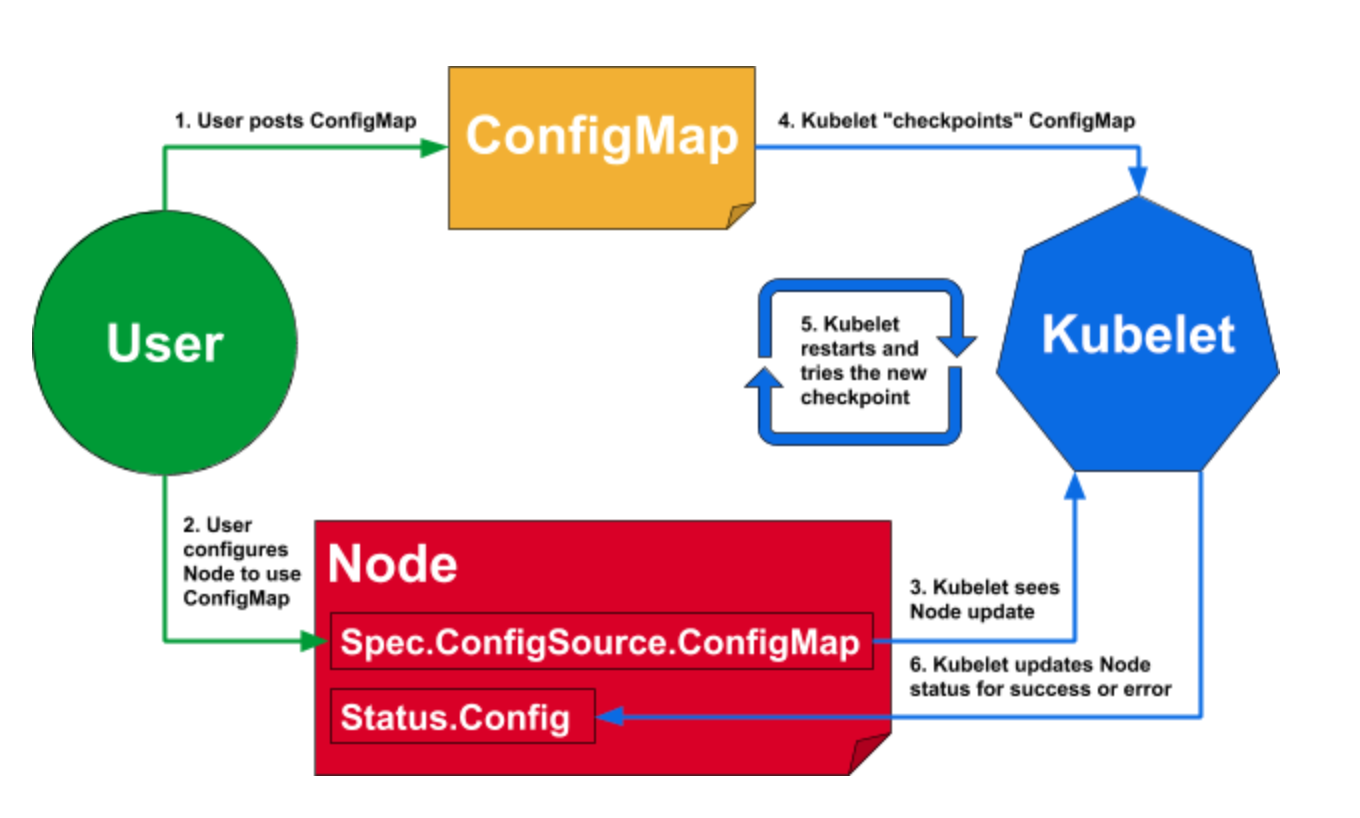
Dynamic-kubelet-configuration:
https://kubernetes.io/blog/2018/07/11/dynamic-kubelet-configuration/ )
kubelet-diagram

Enable kubelet systemd service before calling kubeadm
$ systemctl enable kubelet.service


2.
Be sure to tear down previous k8s if there's one.
(Reference:
https://kubernetes.io/docs/setup/independent/create-cluster-kubeadm/#tear-down)
  • Drain the node if it has pod's running on it
    $ kubectl drain <node name> --delete-local-data --force --ignore-daemonsets
    $ kubectl delete node <node name>
  • $ kubeadm reset
  • $ iptables -F && iptables -t nat -F && iptables -t mangle -F && iptables -X
  • Reset IPVS if necessary
    $ ipvsadm -C
3.
Use kubeadm to generate config/manifest files.
(Reference:
https://kubernetes.io/docs/setup/production-environment/tools/kubeadm/install-kubeadm/

https://kubernetes.io/docs/concepts/overview/components/#master-components

https://kubernetes.io/docs/setup/independent/create-cluster-kubeadm/ )

kubeadm generates /var/lib/kubelet/config.yaml for kubelet to create
containers for k8s master services.

-- Using docker for dev environment --
Reference:
https://kubernetes.io/docs/setup/cri/

On my openSuSE enviroment, CRI-O is the default container runtime.
kubeadm uses CRI-O's 'conmon' to create containers.
(CRI-O reference:
https://medium.com/cri-o/cri-o-198c84185c94 )

For showing current CRI-O's cgroups driver:
(Reference: https://github.com/cri-o/cri-o/issues/2414)
Under /etc/crio/crio.conf grep for cgroup_manager
This information is needed by control plane kubelet's setting( /etc/sysconfig/kubelet ):
--cgroup-driver=systemd

Note: Since --cgroup-driver flag has been deprecated by kubelet, if you have that in /var/lib/kubelet/kubeadm-flags.env or /etc/default/kubelet(/etc/sysconfig/kubelet for RPMs), please remove it and use the KubeletConfiguration instead (stored in /var/lib/kubelet/config.yaml by default).


CMD for CRI-O:
Allow non-root user uses crictl:
chmod 0775 /var/run/crio/crio.sock && chgrp docker /var/run/crio/crio.sock
$ crictl pods


Make sure has correct variables
$ cat /etc/sysconfig/kubelet
Or can copy from /usr/share/fillup-templates/sysconfig.kubelet to /etc/sysconfig/kubelet


Letting iptables see bridged traffic:
--
cat <<EOF | sudo tee /etc/sysctl.d/k8s.conf
net.bridge.bridge-nf-call-ip6tables = 1
net.bridge.bridge-nf-call-iptables = 1
EOF

sudo sysctl --system
--

Before trigger kubeadm init, run
$ kubeadm config images pull --cri-socket /var/run/crio/crio.sock

Ignore preflight error reported from SystemVerification due to I'm using btrfs.
(reference:
https://marc.xn--wckerlin-0za.ch/computer/kubernetes-on-ubuntu-16-04 )
$ kubeadm init --pod-network-cidr=10.244.0.0/16 --apiserver-advertise-address=172.30.0.1 --cri-socket=/var/run/crio/crio.sock

CMD for Listing token:
(reference:
https://kubernetes.io/docs/reference/setup-tools/kubeadm/kubeadm-token/ )
$ kubeadm token


4.
Install k8s cluster network CNI plugin:

I choose to use Calico as k8s network proxy,
(reference:
https://kubernetes.io/docs/setup/independent/create-cluster-kubeadm/#pod-network

Do not use flannel as CNI:
https://github.com/kubernetes/website/commit/f73647531dcdade2327412253a5f839781d57897/
)

Not needed if sysctl is set above:
$ sysctl net.bridge.bridge-nf-call-iptables=1

Run as NON-ROOT
$ kubectl apply -f https://docs.projectcalico.org/v3.11/manifests/calico.yaml

Remember to turn off firewall if can not connect to local pod.
systemctl stop firewalld

5.
Using control plane node as single node k8s which allows it to be
scheduled for pod creating.
(reference:
https://kubernetes.io/docs/setup/independent/create-cluster-kubeadm/ )
$ kubectl taint nodes --all node-role.kubernetes.io/master-


Service Account

Service Account usernames format:
  • system:serviceaccount:<namespace>:<service account name>


Authentication

  • system:unauthenticated group is used for requests where none of the authentication plugins could authenticate the client.
  • system:authenticated group is automatically assigned to a user who was authenticated successfully.
  • system:serviceaccounts group encompasses all ServiceAccounts in the system. 
  • system:serviceaccounts:<namespace> includes all ServiceAccounts in a specific namespace.

Kubernetes uses 
  • client certificates, 
  • bearer tokens, 
  • an authenticating proxy, 
  • or HTTP basic auth 
to authenticate API requests through authentication plugins. 

As HTTP requests are made to the API server, plugins attempt to associate the following attributes with the request:
  • Username: a string which identifies the end user. Common values might be kube-admin or jane@example.com.
  • UID: a string which identifies the end user and attempts to be more consistent and unique than username.
  • Groups: a set of strings which associate users with a set of commonly grouped users.
  • Extra fields: a map of strings to list of strings which holds additional information authorizers may find useful.


Authorization


$ k get clusterrolebindings
$ k get clusterroles
Most important roles:
  • admin
  • cluster-admin
  • edit
  • view

Rolebinding service account to cluster-admin cluster role gives you EVERYTHING.


$ k get clusterroles cluster-admin -o yaml
----
apiVersion: rbac.authorization.k8s.io/v1beta1
kind: ClusterRole
metadata:
  annotations:
    rbac.authorization.kubernetes.io/autoupdate: "true"
  labels:
    kubernetes.io/bootstrapping: rbac-defaults
  name: cluster-admin
rules:
- apiGroups:
  - '*'
  resources:
  - '*'
  verbs:
  - '*'
- nonResourceURLs:
  - '*'
  verbs:
  - '*'
----

$ k get clusterroles admin -o yaml
----
apiVersion: rbac.authorization.k8s.io/v1beta1
kind: ClusterRole
metadata:
  annotations:
    rbac.authorization.kubernetes.io/autoupdate: "true"
  creationTimestamp: 2018-11-20T21:04:20Z
  labels:
    kubernetes.io/bootstrapping: rbac-defaults
  name: admin
  resourceVersion: "19"
  selfLink: /apis/rbac.authorization.k8s.io/v1beta1/clusterroles/admin
  uid: d95beeca-ed07-11e8-bd26-005056b92976
rules:
- apiGroups:
  - ""
  resources:
  - pods
  - pods/attach
  - pods/exec
  - pods/portforward
  - pods/proxy
  verbs:
  - create
  - delete
  - deletecollection
  - get
  - list
  - patch
  - update
  - watch
- apiGroups:
  - ""
  resources:
  - configmaps
  - endpoints
  - persistentvolumeclaims
  - replicationcontrollers
  - replicationcontrollers/scale
 - secrets
  - serviceaccounts
  - services
  - services/proxy
  verbs:
  - create
  - delete
  - deletecollection
  - get
  - list
  - patch
  - update
  - watch
- apiGroups:
  - ""
  resources:
  - bindings
  - events
  - limitranges
  - namespaces/status
  - pods/log
  - pods/status
  - replicationcontrollers/status
  - resourcequotas
  - resourcequotas/status
  verbs:
  - get
  - list
  - watch
- apiGroups:
  - ""
  resources:
  - namespaces
  verbs:
  - get
  - list
  - watch
...
----


K8S Deployment


Be aware that if the pod template in the Deployment references a ConfigMap (or a Secret), modifying the ConfigMap will not trigger an update. 
One way to trigger an update when you need to modify an app’s config is to create a new ConfigMap and modify the pod template so it references the new ConfigMap.
During the rolling upgrade, the old replicset will not be deteled due to useful for rolling back.

--

spec: 
   strategy:
      rollingUpdate: 
         maxSurge: 1
         maxUnavailable: 0
      type: RollingUpdate 
--


K8S DNS Types

  • Service
    XXX.{namespace}.svc.cluster.local
  • Pod
    XXX.{namespace}.pod.cluster.local


Cheatsheet

https://kubernetes.io/docs/reference/kubectl/cheatsheet/


API Reference

https://kubernetes.io/docs/reference/generated/kubernetes-api/v1.13/


CRI Runtime

CRI-O

Sep 28, 2018

[k8s][admin] k8s skaffold

skaffold is an automation tool for deploying bits to k8s in a pipeline fashion.

Act as watchman for k8s deployment by monitoring the changes of files depicted
inside the Dockerfile's "COPY/ADD" commands. (skaffold does honor .dockerignore [file format])

Once the files stats' last time modification changed, skaffold will kick off image build(docker build) and deploy the built images to k8s.
(either through kubectl / helm / kustomize)

The tool is relatively new and not well documented, here's the example I created for future reference. (Some hidden yaml key/value features can only be seen through the source code :-D )

It supports bazel build as well, will add example for that later(WIP).
It supports kaniko build which could build Dockerfile without docker daemon(With gVisor).

https://github.com/buddhavs/k8s_skaffold_example

Reference:
official skaffold.yaml annotation

Update:
Turns out a better document for skaffold is here (for devs :-D ):
https://skaffold.dev/