Creates dummy network link for k8s through systemd:
Reference:
Systemd notes: http://vsdmars.blogspot.com/2018/09/systemdadmin-verbatim-write-up-from.html
systemd.netdev — Virtual Network Device configuration
systemd.network — Network configuration
1. Under /etc/systemd/network creates
.netdev
.network
2.
10-eth42.netdev:
3.
20-eth42.network:
4. Use $ networkctl to show network device information.
For every systemd config, place under:
$ /etc/systemd
DO NOT TOUCH
/usr/lib/systemd
Copy Backup systemd files to /etc/systemd:
Be sure SWAP is turned off:
Reference:
https://wiki.archlinux.org/index.php/Swap#Disabling_swap
https://fedoramagazine.org/systemd-masking-units/
1. edit /etc/fstab make sure swap is commented.
2. if using systemd, first make sure which .swap type is responsible:
$ systemctl --type swap
3. Mask it:
$ systemctl mask dev-nvme0n1p3.swap
Document reference:
https://kubernetes.io/docs/setup/production-environment/tools/kubeadm/install-kubeadm/
Download latest binary:
https://github.com/kubernetes/kubernetes/releases
Reference:
https://kubernetes.io/docs/setup/independent/create-cluster-kubeadm/
1.
Be sure kubelet is installed with systemd, which will be triggered to run with kubeadm.
(Reference:
https://kubernetes.io/docs/reference/command-line-tools-reference/kubelet/
Dynamic-kubelet-configuration:
https://kubernetes.io/blog/2018/07/11/dynamic-kubelet-configuration/ )
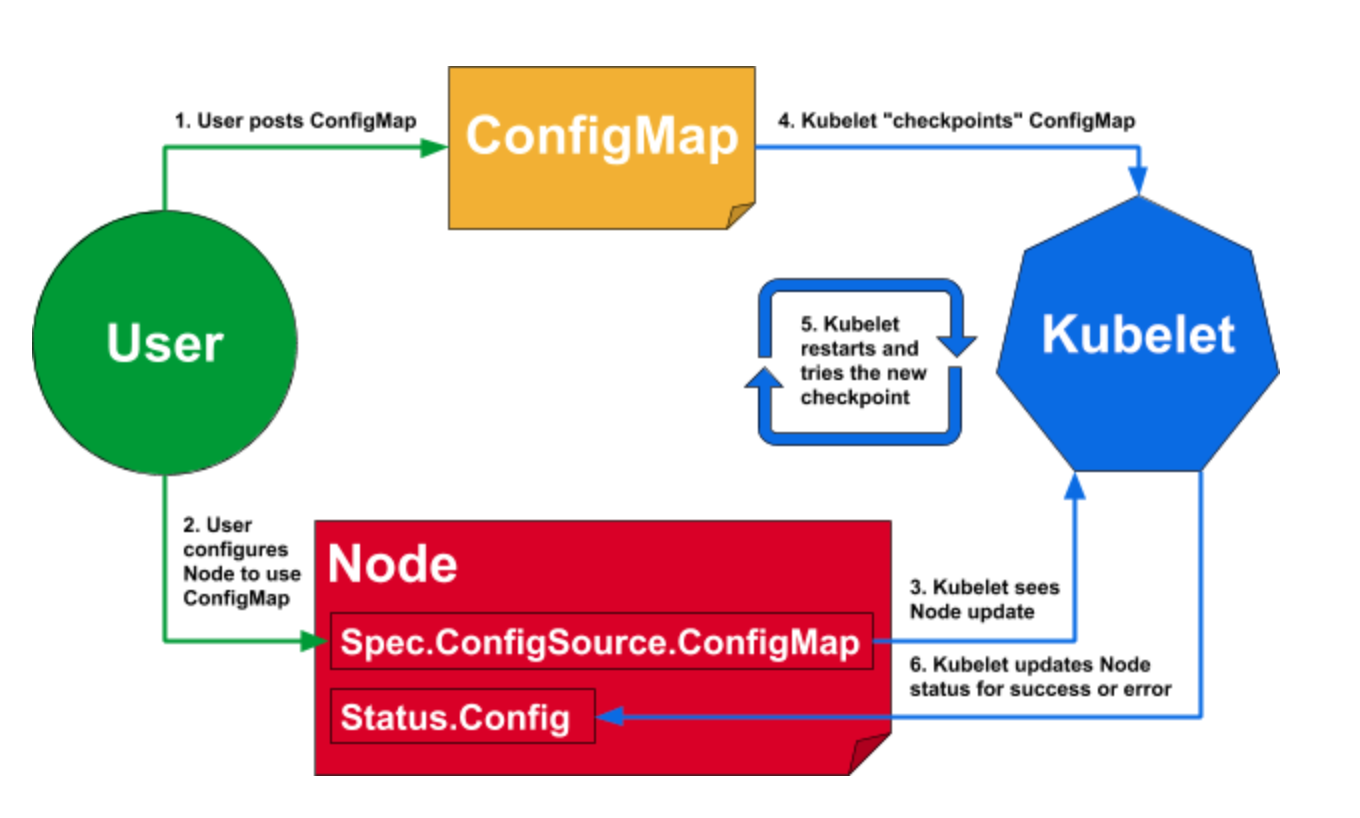
Enable kubelet systemd service before calling kubeadm
$ systemctl enable kubelet.service
2.
Be sure to tear down previous k8s if there's one.
(Reference:
https://kubernetes.io/docs/setup/independent/create-cluster-kubeadm/#tear-down)
Use kubeadm to generate config/manifest files.
(Reference:
https://kubernetes.io/docs/setup/production-environment/tools/kubeadm/install-kubeadm/
https://kubernetes.io/docs/concepts/overview/components/#master-components
https://kubernetes.io/docs/setup/independent/create-cluster-kubeadm/ )
kubeadm generates /var/lib/kubelet/config.yaml for kubelet to create
containers for k8s master services.
-- Using docker for dev environment --
Reference:
https://kubernetes.io/docs/setup/cri/
On my openSuSE enviroment, CRI-O is the default container runtime.
kubeadm uses CRI-O's 'conmon' to create containers.
(CRI-O reference:
https://medium.com/cri-o/cri-o-198c84185c94 )
For showing current CRI-O's cgroups driver:
(Reference: https://github.com/cri-o/cri-o/issues/2414)
Under /etc/crio/crio.conf grep for cgroup_manager
This information is needed by control plane kubelet's setting( /etc/sysconfig/kubelet ):
--cgroup-driver=systemd
Note: Since --cgroup-driver flag has been deprecated by kubelet, if you have that in /var/lib/kubelet/kubeadm-flags.env or /etc/default/kubelet(/etc/sysconfig/kubelet for RPMs), please remove it and use the KubeletConfiguration instead (stored in /var/lib/kubelet/config.yaml by default).
CMD for CRI-O:
Allow non-root user uses crictl:
$ chmod 0775 /var/run/crio/crio.sock && chgrp docker /var/run/crio/crio.sock
$ crictl pods
Make sure has correct variables
$ cat /etc/sysconfig/kubelet
Or can copy from /usr/share/fillup-templates/sysconfig.kubelet to /etc/sysconfig/kubelet
Letting iptables see bridged traffic:
--
cat <<EOF | sudo tee /etc/sysctl.d/k8s.conf
net.bridge.bridge-nf-call-ip6tables = 1
net.bridge.bridge-nf-call-iptables = 1
EOF
sudo sysctl --system
--
Before trigger kubeadm init, run
$ kubeadm config images pull --cri-socket /var/run/crio/crio.sock
Ignore preflight error reported from SystemVerification due to I'm using btrfs.
(reference:
https://marc.xn--wckerlin-0za.ch/computer/kubernetes-on-ubuntu-16-04 )
$ kubeadm init --pod-network-cidr=10.244.0.0/16 --apiserver-advertise-address=172.30.0.1 --cri-socket=/var/run/crio/crio.sock
CMD for Listing token:
(reference:
https://kubernetes.io/docs/reference/setup-tools/kubeadm/kubeadm-token/ )
$ kubeadm token
4.
Install k8s cluster network CNI plugin:
I choose to use Calico as k8s network proxy,
(reference:
https://kubernetes.io/docs/setup/independent/create-cluster-kubeadm/#pod-network
Do not use flannel as CNI:
https://github.com/kubernetes/website/commit/f73647531dcdade2327412253a5f839781d57897/
)
Not needed if sysctl is set above:
$ sysctl net.bridge.bridge-nf-call-iptables=1
Run as NON-ROOT
$ kubectl apply -f https://docs.projectcalico.org/v3.11/manifests/calico.yaml
Remember to turn off firewall if can not connect to local pod.
$ systemctl stop firewalld
5.
Using control plane node as single node k8s which allows it to be
scheduled for pod creating.
(reference:
https://kubernetes.io/docs/setup/independent/create-cluster-kubeadm/ )
$ kubectl taint nodes --all node-role.kubernetes.io/master-
https://kubernetes.io/docs/setup/independent/create-cluster-kubeadm/
https://kubernetes.io/docs/setup/independent/high-availability/
Kubernetes uses


$ k get clusterrolebindings
$ k get clusterroles
Most important roles:
Rolebinding service account to cluster-admin cluster role gives you EVERYTHING.

$ k get clusterroles cluster-admin -o yaml
----
apiVersion: rbac.authorization.k8s.io/v1beta1
kind: ClusterRole
metadata:
annotations:
rbac.authorization.kubernetes.io/autoupdate: "true"
labels:
kubernetes.io/bootstrapping: rbac-defaults
name: cluster-admin
rules:
- apiGroups:
- '*'
resources:
- '*'
verbs:
- '*'
- nonResourceURLs:
- '*'
verbs:
- '*'
$ k get clusterroles admin -o yaml
----
apiVersion: rbac.authorization.k8s.io/v1beta1
kind: ClusterRole
metadata:
annotations:
rbac.authorization.kubernetes.io/autoupdate: "true"
creationTimestamp: 2018-11-20T21:04:20Z
labels:
kubernetes.io/bootstrapping: rbac-defaults
name: admin
resourceVersion: "19"
selfLink: /apis/rbac.authorization.k8s.io/v1beta1/clusterroles/admin
uid: d95beeca-ed07-11e8-bd26-005056b92976
rules:
- apiGroups:
- ""
resources:
- pods
- pods/attach
- pods/exec
- pods/portforward
- pods/proxy
verbs:
- create
- delete
- deletecollection
- get
- list
- patch
- update
- watch
- apiGroups:
- ""
resources:
- configmaps
- endpoints
- persistentvolumeclaims
- replicationcontrollers
- replicationcontrollers/scale
----

Be aware that if the pod template in the Deployment references a ConfigMap (or a Secret), modifying the ConfigMap will not trigger an update.


Reference:
Systemd notes: http://vsdmars.blogspot.com/2018/09/systemdadmin-verbatim-write-up-from.html
systemd.netdev — Virtual Network Device configuration
systemd.network — Network configuration
1. Under /etc/systemd/network creates
.netdev
.network
2.
10-eth42.netdev:
[NetDev]
Name=eth42
Kind=dummy
3.
20-eth42.network:
[Match]
Name=eth42

[Network]
Address=172.30.0.1/16
DNS=8.8.8.8
4. Use $ networkctl to show network device information.
For every systemd config, place under:
$ /etc/systemd
DO NOT TOUCH
/usr/lib/systemd
Copy Backup systemd files to /etc/systemd:
- system/kubelet.service
- system/crio.service.d/10-crio.conf
- network/10-eth42.netdev
- network/20-eth42.network
Be sure SWAP is turned off:
Reference:
https://wiki.archlinux.org/index.php/Swap#Disabling_swap
https://fedoramagazine.org/systemd-masking-units/
1. edit /etc/fstab make sure swap is commented.
2. if using systemd, first make sure which .swap type is responsible:
$ systemctl --type swap
3. Mask it:
$ systemctl mask dev-nvme0n1p3.swap
Document reference:
https://kubernetes.io/docs/setup/production-environment/tools/kubeadm/install-kubeadm/
Download latest binary:
https://github.com/kubernetes/kubernetes/releases
Reference:
https://kubernetes.io/docs/setup/independent/create-cluster-kubeadm/
1.
Be sure kubelet is installed with systemd, which will be triggered to run with kubeadm.
(Reference:
https://kubernetes.io/docs/reference/command-line-tools-reference/kubelet/
Dynamic-kubelet-configuration:
https://kubernetes.io/blog/2018/07/11/dynamic-kubelet-configuration/ )
Enable kubelet systemd service before calling kubeadm
$ systemctl enable kubelet.service
2.
Be sure to tear down previous k8s if there's one.
(Reference:
https://kubernetes.io/docs/setup/independent/create-cluster-kubeadm/#tear-down)
- Drain the node if it has pod's running on it
$ kubectl drain <node name> --delete-local-data --force --ignore-daemonsets
$ kubectl delete node <node name> - $ kubeadm reset
- $ iptables -F && iptables -t nat -F && iptables -t mangle -F && iptables -X
- Reset IPVS if necessary
$ ipvsadm -C
Use kubeadm to generate config/manifest files.
(Reference:
https://kubernetes.io/docs/setup/production-environment/tools/kubeadm/install-kubeadm/
https://kubernetes.io/docs/concepts/overview/components/#master-components
https://kubernetes.io/docs/setup/independent/create-cluster-kubeadm/ )
kubeadm generates /var/lib/kubelet/config.yaml for kubelet to create
containers for k8s master services.
-- Using docker for dev environment --
Reference:
https://kubernetes.io/docs/setup/cri/
On my openSuSE enviroment, CRI-O is the default container runtime.
kubeadm uses CRI-O's 'conmon' to create containers.
(CRI-O reference:
https://medium.com/cri-o/cri-o-198c84185c94 )
For showing current CRI-O's cgroups driver:
(Reference: https://github.com/cri-o/cri-o/issues/2414)
Under /etc/crio/crio.conf grep for cgroup_manager
This information is needed by control plane kubelet's setting( /etc/sysconfig/kubelet ):
--cgroup-driver=systemd
Note: Since --cgroup-driver flag has been deprecated by kubelet, if you have that in /var/lib/kubelet/kubeadm-flags.env or /etc/default/kubelet(/etc/sysconfig/kubelet for RPMs), please remove it and use the KubeletConfiguration instead (stored in /var/lib/kubelet/config.yaml by default).
CMD for CRI-O:
Allow non-root user uses crictl:
$ chmod 0775 /var/run/crio/crio.sock && chgrp docker /var/run/crio/crio.sock
$ crictl pods
Make sure has correct variables
$ cat /etc/sysconfig/kubelet
Or can copy from /usr/share/fillup-templates/sysconfig.kubelet to /etc/sysconfig/kubelet
Letting iptables see bridged traffic:
--
cat <<EOF | sudo tee /etc/sysctl.d/k8s.conf
net.bridge.bridge-nf-call-ip6tables = 1
net.bridge.bridge-nf-call-iptables = 1
EOF
sudo sysctl --system
--
Before trigger kubeadm init, run
$ kubeadm config images pull --cri-socket /var/run/crio/crio.sock
Ignore preflight error reported from SystemVerification due to I'm using btrfs.
(reference:
https://marc.xn--wckerlin-0za.ch/computer/kubernetes-on-ubuntu-16-04 )
$ kubeadm init --pod-network-cidr=10.244.0.0/16 --apiserver-advertise-address=172.30.0.1 --cri-socket=/var/run/crio/crio.sock
CMD for Listing token:
(reference:
https://kubernetes.io/docs/reference/setup-tools/kubeadm/kubeadm-token/ )
$ kubeadm token
4.
Install k8s cluster network CNI plugin:
I choose to use Calico as k8s network proxy,
(reference:
https://kubernetes.io/docs/setup/independent/create-cluster-kubeadm/#pod-network
Do not use flannel as CNI:
https://github.com/kubernetes/website/commit/f73647531dcdade2327412253a5f839781d57897/
)
Not needed if sysctl is set above:
$ sysctl net.bridge.bridge-nf-call-iptables=1
Run as NON-ROOT
$ kubectl apply -f https://docs.projectcalico.org/v3.11/manifests/calico.yaml
Remember to turn off firewall if can not connect to local pod.
$ systemctl stop firewalld
5.
Using control plane node as single node k8s which allows it to be
scheduled for pod creating.
(reference:
https://kubernetes.io/docs/setup/independent/create-cluster-kubeadm/ )
$ kubectl taint nodes --all node-role.kubernetes.io/master-
Service Account
Service Account usernames format:
- system:serviceaccount:<namespace>:<service account name>
kubeadm
https://kubernetes.io/docs/reference/setup-tools/kubeadm/kubeadm/https://kubernetes.io/docs/setup/independent/create-cluster-kubeadm/
https://kubernetes.io/docs/setup/independent/high-availability/
Authentication
https://kubernetes.io/docs/reference/access-authn-authz/authentication/
https://kubernetes.io/docs/tasks/access-application-cluster/configure-access-multiple-clusters/
https://kubernetes.io/docs/reference/access-authn-authz/rbac/
https://github.com/kubernetes/website/issues/3820
https://kubernetes.io/docs/tasks/access-application-cluster/configure-access-multiple-clusters/
https://kubernetes.io/docs/reference/access-authn-authz/rbac/
https://github.com/kubernetes/website/issues/3820
- system:unauthenticated group is used for requests where none of the authentication plugins could authenticate the client.
- system:authenticated group is automatically assigned to a user who was authenticated successfully.
- system:serviceaccounts group encompasses all ServiceAccounts in the system.
- system:serviceaccounts:<namespace> includes all ServiceAccounts in a specific namespace.
Kubernetes uses
- client certificates,
- bearer tokens,
- an authenticating proxy,
- or HTTP basic auth
As HTTP requests are made to the API server, plugins attempt to associate the following attributes with the request:
- Username: a string which identifies the end user. Common values might be kube-admin or jane@example.com.
- UID: a string which identifies the end user and attempts to be more consistent and unique than username.
- Groups: a set of strings which associate users with a set of commonly grouped users.
- Extra fields: a map of strings to list of strings which holds additional information authorizers may find useful.
Authorization


$ k get clusterrolebindings
$ k get clusterroles
Most important roles:
- admin
- cluster-admin
- edit
- view
Rolebinding service account to cluster-admin cluster role gives you EVERYTHING.

$ k get clusterroles cluster-admin -o yaml
----
apiVersion: rbac.authorization.k8s.io/v1beta1
kind: ClusterRole
metadata:
annotations:
rbac.authorization.kubernetes.io/autoupdate: "true"
labels:
kubernetes.io/bootstrapping: rbac-defaults
name: cluster-admin
rules:
- apiGroups:
- '*'
resources:
- '*'
verbs:
- '*'
- nonResourceURLs:
- '*'
verbs:
- '*'
----
$ k get clusterroles admin -o yaml
----
apiVersion: rbac.authorization.k8s.io/v1beta1
kind: ClusterRole
metadata:
annotations:
rbac.authorization.kubernetes.io/autoupdate: "true"
creationTimestamp: 2018-11-20T21:04:20Z
labels:
kubernetes.io/bootstrapping: rbac-defaults
name: admin
resourceVersion: "19"
selfLink: /apis/rbac.authorization.k8s.io/v1beta1/clusterroles/admin
uid: d95beeca-ed07-11e8-bd26-005056b92976
rules:
- apiGroups:
- ""
resources:
- pods
- pods/attach
- pods/exec
- pods/portforward
- pods/proxy
verbs:
- create
- delete
- deletecollection
- get
- list
- patch
- update
- watch
- apiGroups:
- ""
resources:
- configmaps
- endpoints
- persistentvolumeclaims
- replicationcontrollers
- replicationcontrollers/scale
- secrets
- serviceaccounts
- services
- services/proxy
verbs:
- create
- delete
- deletecollection
- get
- list
- patch
- update
- watch
- apiGroups:
- ""
resources:
- bindings
- events
- limitranges
- namespaces/status
- pods/log
- pods/status
- replicationcontrollers/status
- resourcequotas
- resourcequotas/status
verbs:
- get
- list
- watch
- apiGroups:
- ""
resources:
- namespaces
verbs:
- get
- list
- watch
...
K8S Deployment

Be aware that if the pod template in the Deployment references a ConfigMap (or a Secret), modifying the ConfigMap will not trigger an update.
One way to trigger an update when you need to modify an app’s config is to create a new ConfigMap and modify the pod template so it references the new ConfigMap.
During the rolling upgrade, the old replicset will not be deteled due to useful for rolling back.
--
spec:
During the rolling upgrade, the old replicset will not be deteled due to useful for rolling back.
--
spec:
strategy:
rollingUpdate:
rollingUpdate:
maxSurge: 1
maxUnavailable: 0
type: RollingUpdate
type: RollingUpdate
--


K8S DNS Types
- Service
XXX.{namespace}.svc.cluster.local - Pod
XXX.{namespace}.pod.cluster.local

